ajax 메소드화
아래는 ajax를 메소드화한 것이다. sendPost(출력할 div id, 가져올 파일, 넘길 파라미터) 또는 sendGet 으로 쉽게 ajax를 쓸 수 있다.
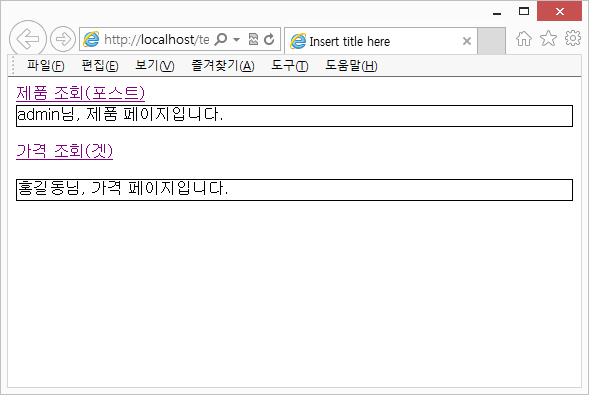
예를 들어 index.jsp에 login.jsp파일을 갖다 쓰고 싶다고 하자. 우선 index.jsp 안에 div를 하나 만든다. 이 div의 id가 temp 라고 하자. 그리고 id와 pwd라는 파라미터를 넘긴다고 해보자. 그럴경우 아래와 같이 링크걸 수 있다.
<a href=”javascript:sendPost(‘temp’,‘login.jsp’,‘id=admin&pwd=1234’)”>로그인</a>
//sendPost(출력할 div id, 가져올 파일, 넘길 파라미터)
————————————————————————————-
index.jsp
|
<%@ page language=”java” contentType=”text/html; charset=EUC-KR”
pageEncoding=”EUC-KR”%>
<!DOCTYPE html>
<html>
<head>
<meta charset=”EUC-KR”>
<title>Insert title here</title>
<script src=”pppAjax.js” type=”text/javascript”></script>
<!– <script type=”text/javascript”> –>
<!– </script> –>
</head>
<body>
<form name=”frm”>
<input type=”hidden” name=”id” value=”admin”>
<a href=”javascript:sendPost(‘div1′,’product.jsp’,’id=’+document.frm.id.value)”>제품 조회(포스트)</a>
</form>
<div id=”div1″ style=”border:1px solid #000000;”></div>
<p>
<a href=”javascript:sendGet(‘div2′,’price.jsp’,’name=홍길동’)”>가격 조회(겟)</a>
<div id=”div2″style=”border:1px solid #000000;”></div>
</body>
</html>
|
pppAjax.js
|
var httpRequest=null;
var pView=null;
function createHttpRequest(){
if(window.ActiveXObject) //IE
{ return new ActiveXObject(“Msxml2.XMLHTTP”); }
else if(window.XMLHttpRequest)//Crome,FireFox
{ return new XMLHttpRequest(); }
else//NOT SUPPORT
{ return null; }
}
function sendPost(divId,pFile,pValue){
httpRequest=createHttpRequest();
httpRequest.open(“POST”,pFile,true);
httpRequest.setRequestHeader(“Content-Type”,”application/x-www-form-urlencoded”);
httpRequest.send(pValue); //id=aaa&pwd=1234
pView=divId;
httpRequest.onreadystatechange=pResult;
}
function sendGet(divId,pFile,pValue){
httpRequest=createHttpRequest();
if(pValue==null||pValue==””){
httpRequest.open(“GET”,pFile,true);
}
else{
httpRequest.open(“GET”,pFile+”?”+pValue,true);}//id=aaa&pwd=1234
httpRequest.send(null);
pView=divId;
httpRequest.onreadystatechange=pResult;
}
function pResult(){
if(httpRequest.readyState==4){
if(httpRequest.status==200){
var div=document.getElementById(pView);
div.innerHTML=httpRequest.responseText;
}
}
}
|
price.jsp
|
<%@ page language=”java” contentType=”text/html; charset=EUC-KR”
pageEncoding=”EUC-KR”%>
<% String name=request.getParameter(“name”);%>
<!DOCTYPE html>
<html>
<head>
<meta charset=”EUC-KR”>
<title>Insert title here</title>
</head>
<body>
<%=name%>님, 가격 페이지입니다.
</body>
</html>
|
product.jsp
|
<%@ page language=”java” contentType=”text/html; charset=EUC-KR”
pageEncoding=”EUC-KR”%>
<% String id=request.getParameter(“id”); %>
<!DOCTYPE html>
<html>
<head>
<meta charset=”EUC-KR”>
<title>Insert title here</title>
</head>
<body>
<%=id%>님, 제품 페이지입니다.
</body>
</html>
|